
featured desktops video

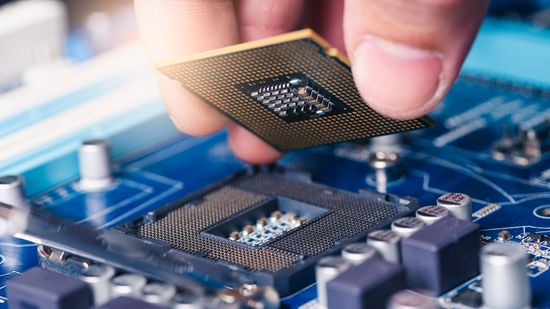
Upgrading a PC

Learn how to upgrade a PC!


You need the Flash Player version 8.0.0.0 or higher and a JavaScript enabled browser to view this site

browse videos in desktops

BumpTop Desktops (6:36)

Watch this video from TED to hear from Anand Agarawala as he demos his BumpTop desktop. The BumpTop is a user interface that takes the usual desktop metaphor to new heights. You have to see this to believe it.

Episode 27: Keep Your PC Cool (14:08)

In episode 27, Andy and Sean show you how to groom the inside of your PC to optimize airflow.

Cool PCs...No More Boring Gray Boxes (1:48)

Watch this video about cool, new personal computers on HowStuffWorks. The days of the boring gray box are gone. Check out these new and crazy computers that were all part of an Intel design competition. Video is courtesy of MultiVu.

Dell Showcases Iron Port Case (3:54)

Watch this video about a case study illustrating how an IT company protects companies from inbound and outbound web traffic. See how the Internet infrastructure works in this video from Dell.

Launch of Dell XPS 710 H2C at CES (5:08)

Watch this video about the launch of a new powerful Dell computer for gaming and entertainment on HowStuffWorks. The new Dell XPS 710 H2C computer has an internal cooling system that uses water. See how liquid cooled PCs work in this video from... More »

recently added

It's All Geek To Me: Straightening and Cropping Pics (1:30)

Tech expert David Pogue explains how to efficiently straighten and crop for more aesthetically pleasing digital pictures. Learn more in this clip from The Science Channel's "It's All Geek To Me."

It's All Geek to Me: How to Repair a Floppy Disk (0:47)

Learn some tricks on how to repair a damaged floppy disk on The Science Channel's "It's All Geek to Me."

It's All Geek to Me: Saving Battery Power on a Laptop (1:15)

New York Times tech writer David Pogue gives tricks on how to prolong your battery life on an airplane. Learn more on The Science Channel's "It's All Geek to Me."

It's All Geek to Me: PowerPoint Presentation Tips (1:41)

New York Times tech writer David Pogue demonstrates an easy way to remember jokes and information for any presentation. Learn more on The Science Channel's "It's All Geek to Me."

It's All Geek to Me: Internet Connection on the Road (2:41)

New York Times tech writer David Pogue explains how to get internet access when you are in a hotel with no internet. Learn more on The Science Channel's "It's All Geek to Me."

Online Research Techniques: Online Research Skills (1:03)

Web research may be carefully planned to maximize efficacy.

Online Research Techniques: Online Information Sources (2:46)

The online world is composed of people and their computers. Online service providers are the first step to accessing the Internet.

Online Research: Online Safety Guidelines (1:15)

Never give out your full name, address, or phone number to strangers you meet online; not all information on the web or in newsgroups is correct or verified.

Online Research: Newsgroups (2:01)

Newsgroups are electronic message boards sorted by topic; to use newsgroups, type in your topic and search Usenet, then click on an appropriate forum. You can either e-mail an author of a message or post your own message.

Online Research: Hyperlinks and Internet Address Books (1:48)

When you click on a hyperlink on a Web site, a new page opens. The new page is usually related to the subject of the original page. An Internet address book lists the best sites for various topics.